做cloudmeeting项目已经有一段时间了,目前已经支持了RTMP的部分,但是在支持WebRTC上面遇到了一些困难,于是记录libdatachannel库的使用方法,API以及主要架构
架构 首先,这是一个相较于libwebrtc更加精简的native库在安装过程中有三个部件,ws(websocket)、srtp、core。在安装的时候推荐使用mvsc编译器版本的,即使用vcpkg直接安装(或者其他的包管理器。另外MIngw版本我尝试了很多的方法,诸如conan管理器,Msys2,甚至分部件编译,都无法正常工作。主要是卡在srtp部件中的libsrtp和openssl上面。综上推荐直接使用mvsc版本,即x64-windows(vcpkg)
这个库实现了这样几件事情,用于音频/视频流的 WebRTC 媒体传输(可选)、用于客户端-服务器通信的 WebSocket 协议(可选)。并且提供C++和C两套API,可编译成Wasm。这实际上就提供了很强的扩展性,无论是iWindows程序还是网页程序都是可以无缝迁移的。
一个最小实现
1 2 3 4 5 6 7 8 9 10 11 12 13 14 15 16 17 18 19 20 21 22 23 24 25 26 27 28 29 30 31 32 33 34 35 36 37 38 #include "rtc/rtc.hpp" rtc::configuration config; config.iceServers.emplace_back ("stun:stun.l.google.com:19302" ); rtc::PeerConnection pc (config) ;pc.onLocalDescription ([](rtc::Description sdp) { sendToSignalingServer (std::string (sdp)); }); pc.onLocalCandidate ([](rtc::Candidate candidate) { sendToSignalingServer (candidate.candidate (), candidate.mid ()); }); auto dc = pc.createDataChannel ("test" );dc->onOpen ([]() { std::cout << "Data channel open" << std::endl; }); dc->onMessage ([](std::variant<rtc::binary, rtc::string> message) { if (std::holds_alternative <rtc::string>(message)) { std::cout << "Received: " << std::get <rtc::string>(message) << std::endl; } }); void onRemoteDescriptionReceived (std::string sdp) pc.setRemoteDescription (rtc::Description (sdp)); } void onRemoteCandidateReceived (std::string candidate, std::string mid) pc.addRemoteCandidate (rtc::Candidate (candidate, mid)); }
另外在dc库的代码中使用的设计模式叫做pimpl(pointer to Implementation)。实际上就是通过一个私有的成员指针,将指针指向的类的内部实现全部隐藏。
实例
1 2 3 4 5 6 7 8 9 10 11 12 13 14 15 16 17 18 19 20 21 22 23 24 25 26 27 28 29 30 31 32 33 34 35 36 37 38 39 40 41 42 43 44 45 class PAimpl ; class A { public : A () { } ~A () { } public : void func1 (int a, char * b) bool isEnabled () private : PAimpl* pimpl; }; class PAimpl { public : void func1 (int a, char * b) { } bool isEnabled () { return true ; } }; void A::func1 (int a, char * b) pimpl->func1 (a, b); } bool A::isEnabled () return pimpl->isEnabled (); }
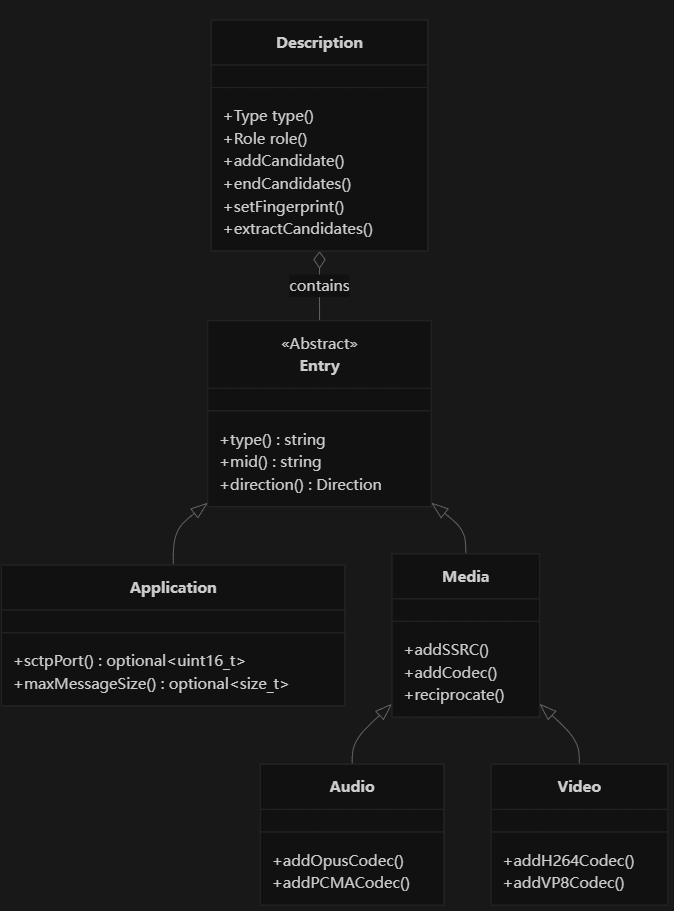
SDP创建 在dc中创建SDP分为两种情况,第一种是仅Datachannel的SDP和第二种传输Track的SDP
第一种不需要传入编码器等参数,SDP会自动生成基本会话信息和SCTP应用层描述。生成SDP包括
1
2
3
4
会话级别信息(v=, o=, s=, t=) ICE 参数(ice-ufrag, ice-pwd, ice-options) DTLS 指纹(fingerprint) SCTP 端口和最大消息大小
第二种需要传递音视频编码器参数,在我的项目中需要与SRS服务器链接,那么需要添加的参数还要更多。
1 2 3 4 5 6 7 8 9 auto audio = std::make_shared <rtc::Description::Audio>("audio" ); audio->addOpusCodec (111 ); auto video = std::make_shared <rtc::Description::Video>("video" ); video->addH264Codec (96 ); video->addH264Codec (96 , "profile-level-id=42e01f;packetization-mode=1" );
datachannel创建